
Function Cards1.0 - App Store
You'll be able to see results in few seconds.
Publisher Description
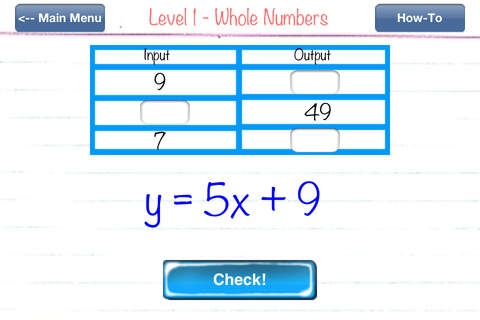
Conceptual understanding of functions is a requisite foundation for success in Algebra and beyond. Students need to understand that a function is a rule that assigns to each input exactly one output.
The Function Cards app presents and connects functions in two representations:
1) Algebraically
2) Numerically in tables
Students working with the app will build mental math strategies while evaluating a variety of linear and exponential expressions with whole numbers, integers, and fractional coefficients.
While working through levels 1-3, students can build an understanding of slope. Level 4 helps students to differentiate between the constant rate of change of linear functions and the increasing rate of change of exponential growth.
Function Cards features 4 Levels:
Level 1: Whole Numbers
Level 2: Fractions
Level 3: Integers
Level 4: Exponents
Developed by a K-8 Math Specialist with the Common Core State Standards in mind, Function Cards features:
- 4 Levels of increasing difficulty
- Machine generated exercises for UNLIMITED practice, challenge, and fun!
- GameCenter Achievement Badges and Leaderboards
- Positive verbal feedback
We hope you enjoy this app and will write us a great review!
Requires iOS 4.3 or later. Compatible with iPhone, iPad, and iPod touch.
About Function Cards
The company that develops Function Cards is Lisa Englard. The latest version released by its developer is 1.0.
To install Function Cards on your iOS device, just click the green Continue To App button above to start the installation process. The app is listed on our website since 2013-04-04 and was downloaded 0 times. We have already checked if the download link is safe, however for your own protection we recommend that you scan the downloaded app with your antivirus. Your antivirus may detect the Function Cards as malware if the download link is broken.
How to install Function Cards on your iOS device:
- Click on the Continue To App button on our website. This will redirect you to the App Store.
- Once the Function Cards is shown in the iTunes listing of your iOS device, you can start its download and installation. Tap on the GET button to the right of the app to start downloading it.
- If you are not logged-in the iOS appstore app, you'll be prompted for your your Apple ID and/or password.
- After Function Cards is downloaded, you'll see an INSTALL button to the right. Tap on it to start the actual installation of the iOS app.
- Once installation is finished you can tap on the OPEN button to start it. Its icon will also be added to your device home screen.
Program Details
System requirements
Download information
Pricing
Version History
version 1.0
posted on 2013-04-04
Disclaimer
Official App Store Link
We do not host Function Cards on our servers. We did not scan it for viruses, adware, spyware or other type of malware. This app is hosted by Apple and passed their terms and conditions to be listed there. We recommend caution when installing it.
The App Store link for Function Cards is provided to you by apps112.com without any warranties, representations or guarantees of any kind, so access it at your own risk.
If you have questions regarding this particular app contact the publisher directly. For questions about the functionalities of apps112.com contact us.
